Place2Place

Place2Place is an AI-powered flight search engine that finds smarter door-to-door routes by combining flight options with rideshare costs. Rather than evaluating airports in isolation, the platform automatically compares nearby airports to surface the most efficient journey.


As the Founding Product Designer, I led research, product strategy, UX/UI design, prototyping, and testing, collaborating closely with the CEO and CTO to bring the MVP from concept to launch.

Founding team

Daniel Greenberg (CEO)

Nina Chang (Product Designer)

Jason Silva (CTO)

Daniel Greenberg (CEO)

Nina Chang (Product Designer)

Jason Silva (CTO)

Category

Startup, desktop, mobile

Startup, desktop, mobile

Timeline

2-week design sprint to MVP launch, followed by post-launch iteration

2-week design sprint to MVP launch, followed by post-launch iteration

Outcome

7,500+ unique users in under 2 months

12,500+ user sessions

7,500+ unique users in under 2 months

12,500+ user sessions

Prefer to skip ahead?

Jump to final product

What does ‘best flight’ really mean?

What does ‘best flight’ really mean?

When you’re searching for flights, most tools define “best” as a mix of price, time, and number of stops… but only for the airport you searched.

When you’re searching for flights, most tools define “best” as a mix of price, time, and number of stops… but only for the airport you searched.

When you're searching for flights, most tools define "best" as a mix of price, time, and number of stops…but only for the airport or city you searched.

If you're near multiple airports, the actual best option might be a different airport entirely.

If you're near multiple airports, the actual best option might be a different airport entirely.

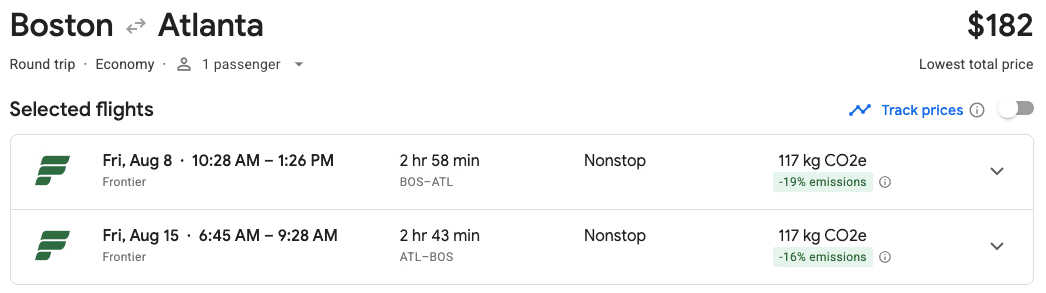
*Image from google flights

*Image from google flights

Take this example:

I’m searching for a flight from Dartmouth, Massachusetts - a small town located between Providence and Boston - to Atlanta. Since Dartmouth is slightly closer to Providence, most flight tools default to searching from Providence Airport, showing the top round-trip option as for $361 with over 4 hours of travel time.

I’m searching for a flight from Dartmouth, Massachusetts - a small town located between Providence and Boston - to Atlanta. Since Dartmouth is slightly closer to Providence, most flight tools default to searching from Providence Airport, showing the top round-trip option as for $361 with over 4 hours of travel time.

But if I’m willing to get a ride for just 20 minutes farther to Boston Logan Airport, I can get a round-trip flight for $182 and under 3 hours: a savings of $179 and an hour of travel time for 20 extra minutes in a car.

But if I’m willing to get a ride for just 20 minutes farther to Boston Logan Airport, I can get a round-trip flight for $182 and under 3 hours: a savings of $179 and an hour of travel time for 20 extra minutes in a car.

But if I’m willing to get a ride for just 20 minutes farther to Boston Logan Airport, I can get a round-trip flight for $182 and under 3 hours: a savings of $179 and an hour of travel time for 20 extra minutes in a car.

But if I’m willing to get a ride for just 20 minutes farther to Boston Logan Airport, I can get a round-trip flight for $182 and under 3 hours: a savings of $179 and an hour of travel time for 20 extra minutes in a car.

But if I’m willing to get a ride for just 20 minutes farther to Boston Logan Airport, I can get a round-trip flight for $182 and under 3 hours: a savings of $179 and an hour of travel time for 20 extra minutes in a car.

But if I’m willing to get a ride for just 20 minutes farther to Boston Logan Airport, I can get a round-trip flight for $182 and under 3 hours: a savings of $179 and an hour of travel time for 20 extra minutes in a car.

What existing tools get wrong

Google Flights and similar platforms only search the specific airport pair you input. To check surrounding airports, you have to:

  • Manually rerun your search with new airport codes.

  • Use separate tools to calculate Uber/Lyft costs.

  • Do your own math to figure out the true "best" option

  • Manually rerun your search with new airport codes.

  • Use separate tools to calculate Uber/Lyft costs.

  • Do your own math to figure out the true "best" option

Cheaper flight options often exist beyond your default search, but finding them is time-consuming and unintuitive.

How can we help travelers find the most cost-effective and time-efficient routes by automatically comparing nearby airports and factoring in ground transportation?

Research

Research

What do travelors think?

What do travelors think?

I interviewed 5 frequent flyers about how they choose flights and search for deals. My goal was to:

  • Understand booking behavior

  • Learn how user compare flights

  • Idenitfy current frustrations

Hannah

Hannah

Student who flies for trips and family visits

Student who flies for trips and family visits

“I don’t mind driving a bit farther if it means saving money or time, but I’m not going to spend an hour figuring that out.”

“I don’t mind driving a bit farther if it means saving money or time, but I’m not going to spend an hour figuring that out.”

“I don’t mind driving a bit farther if it means saving money or time, but I’m not going to spend an hour figuring that out.”

Emma

Emma

Freelancer who flies to meet clients

Freelancer who flies to meet clients

“I did not know that I can get cheaper flights by searching alternate airports. I always assumed that Google flights really showed the ‘best’.”

“I did not know that I can get cheaper flights by searching alternate airports. I always assumed that Google flights really showed the ‘best’.”

“I did not know that I can get cheaper flights by searching alternate airports. I always assumed that Google flights really showed the ‘best’.”

Henry

Henry

Freelancer who flies to meet clients

Freelancer who flies to meet clients

“I honestly don’t care where I fly in and out of as long I get where I need to get.”

“I honestly don’t care where I fly in and out of as long I get where I need to get.”

“I honestly don’t care where I fly in and out of as long I get where I need to get.”

Insights

Insights

Key Insights

Key Insights

Too Much Manual Work

Travelers searching for the best deal often need to manually compare flights across multiple nearby airports and factor in transportation costs for each option. This time-consuming process makes it difficult to identify the cheapest and fastest journey.

Design implication: Automatically compare flights across nearby airports and include transportation costs in a single search, helping travelers find the cheapest and fastest journey without manually evaluating each airport.

Limited Airport Awareness

Limited Airport Awareness

Some travelers never consider nearby airports, causing them to overlook routes that could save significant time and money.

Design implication: Surface alternative airport options and clearly highlight potential cost and time savings to help users discover opportunities they may not otherwise consider.

The Full Journey Matters

Current tools focus only on airfare. They don’t show the true cost or duration when ground travel is involved, making it hard to make informed tradeoffs.

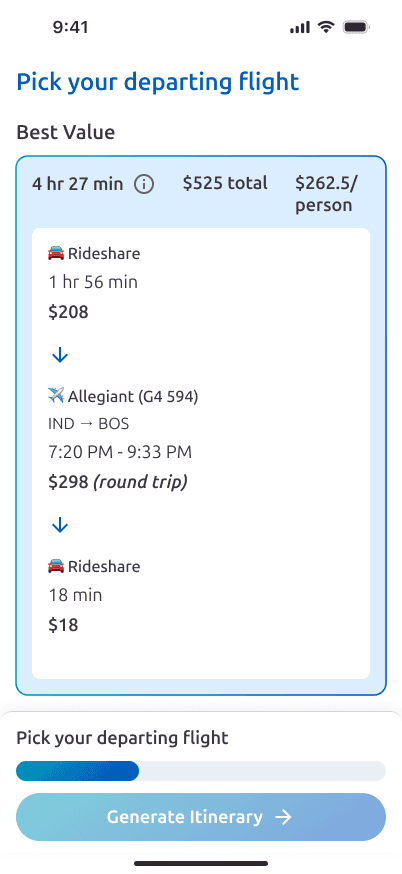
Design implication: Present flights, rideshare costs, total trip cost, and total travel time as a single journey, allowing users to make informed decisions based on the complete travel experience.

Together, these insights span two kinds of travelers:

  • Deal-seekers who'll happily take the extra step if it's made easy for them.

  • Habit-driven travelers who won't look beyond their default airport unless the tool looks for them.

Wire-framing

Wire-framing

User flow

User flow

Given the two-week timeline, the team focused on an MVP centered on the core feature (flight search and itinerary generation) and deprioritized more complex features like account management for later.

Given the two-week timeline, the team focused on an MVP centered on the core feature (flight search and itinerary generation) and deprioritized more complex features like account management for later.

Planning

Planning

Early sketches in Figma explored layout, UI style, and clear ways of displaying comparison data

Early sketches in Figma explored layout, UI style, and clear ways of displaying comparison data

User testing

User testing

Gathering real world feedback

Gathering real world feedback

The method

The method

After launch, we used Statsig, a product experimentation and analytics platform, to review hundreds of live session replays across desktop and mobile and identify friction points.

*live session replays on both desktop and mobile for the initial version of the product

*live session replays on both desktop and mobile for the initial version of the product

Problem 1

Unclear next step:

Most users didn’t realize they needed to select flights to generate a travel itinerary, since the “Generate Itinerary” button was hidden at the bottom of the page.

Most users didn’t realize they needed to select flights to generate a travel itinerary, since the “Generate Itinerary” button was hidden at the bottom of the page.

Solution:

A fixed bar was added at the bottom of the page with a progress indicator, instructions, and a visible “Generate Itinerary” button to better guide users.

A fixed bar was added at the bottom of the page with a progress indicator, instructions, and a visible “Generate Itinerary” button to better guide users.

Problem 2

Address input confusion:

Many users entered only a city or airport instead of their full starting address, which limited our ability to provide the best flight options.

Many users entered only a city or airport instead of their full starting address, which limited our ability to provide the best flight options.

Solution:

A popup appears when an incomplete address is entered, informing users that the tool works best with a full address. After implementing this change, most users corrected their input, allowing the tool to provide more accurate ‘best flight’ options.

A popup appears when an incomplete address is entered, informing users that the tool works best with a full address. After implementing this change, most users corrected their input, allowing the tool to provide more accurate ‘best flight’ options.

Visual Identity

Visual Identity

Color palette

Color palette

Typography

Typography

Header 1

Font: Ubuntu Sans, Bold, 30px

Font: Ubuntu Sans, Bold, 30px

Header 2

Font: Ubuntu Sans, Bold, 24px

Font: Ubuntu Sans, Bold, 24px

Header 3

Font: Ubuntu Sans, Bold, 20px

Font: Ubuntu Sans, Bold, 20px

Body

Font: Ubuntu Sans, Bold, 18px

Font: Ubuntu Sans, Bold, 18px

Label

Font: Ubuntu Sans, Bold, 16px

Font: Ubuntu Sans, Bold, 16px

Final Design

Find the best flight for you and generate your itinerary

Find the best flight for you and generate your itinerary

Where is it now?

Where is it now?

In under 2 months, place2place reached over 7500 unique users and over 12,500 user sessions.

In under 2 months, place2place reached over 7500 unique users and over 12,500 user sessions.

This project is currently paused but you can still check it out at place2place.ai.

Thank you for visiting!

ninachang250@gmail.com

Thank you for visiting!

ninachang250@gmail.com

Thank you for visiting!

ninachang250@gmail.com